
Loops By CDUB
The C-Dub BrandMusic & Audio
3.5196.00 Reviews
- Version
- 5.0
- Installs
- 100.00K
- Age Rating
- Everyone
Screenshots
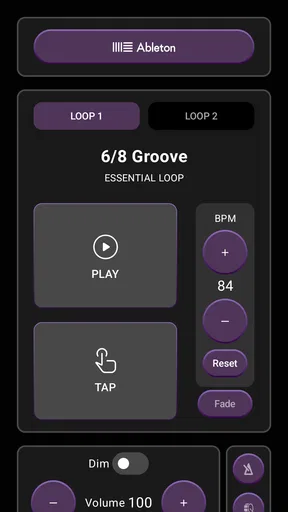
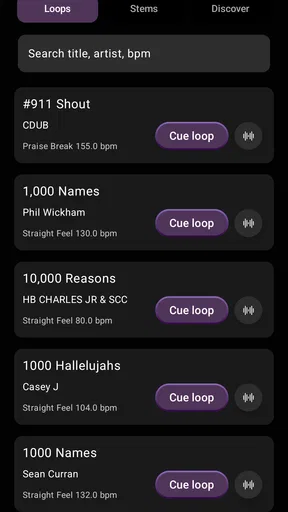
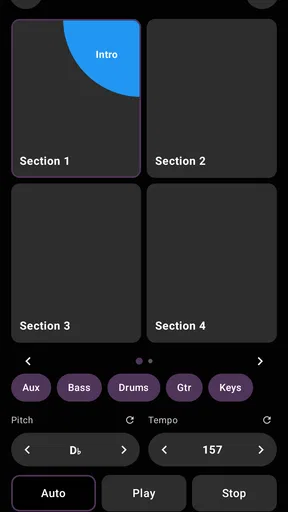
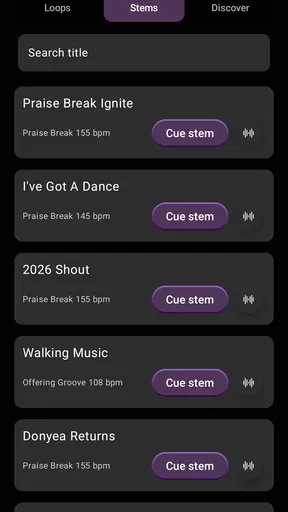
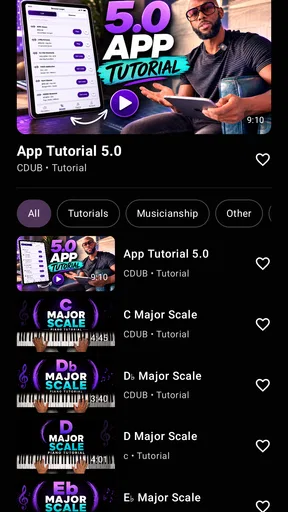
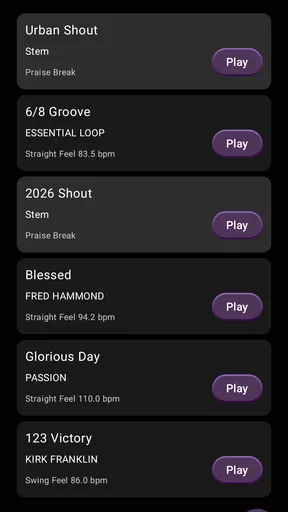
Our Review of Loops By CDUB
 Analysis by Appyee
Shared music-making is where this app makes the most sense to me. Picture a singer arriving early for rehearsal while a drummer is still on the way: a phone or tablet can provide a steady musical bed for warming up, testing a melody, or helping everyone settle into the same feel. Loops By CDUB is a music and audio app from The C-Dub Brand, built around gospel drum loops and click tracks for practice and live performance. Its focus is more specific than a general beat-making tool, which is a real advantage when that is the sound and job you need.
A useful part of a shared rehearsal setup
In a household or group that shares a device, the app can act as a practical rehearsal aid rather than a full recording studio. One person might use a loop to practise singing in time; another might use a click track to work on a part without asking someone else to keep time. That can make a short practice session easier to start, especially when not everyone is available at once.
The important distinction is that a shared device is not the same as shared musical preferences. Gospel-oriented material is the central reason to consider this app, but it will not automatically suit every player in a home. I would treat it as a focused tool for particular rehearsals, not as a universal soundtrack for every instrument, genre, or casual jam.
Keep the workflow simple and agree on a starting point
When several people use one device, a little coordination before playing saves time. I would decide which loop or click track the group is practising with, and who is responsible for starting and stopping it. That avoids the familiar rehearsal pause where one person is ready to sing, another is searching for a beat, and everyone else is waiting.
A helpful habit is to use one shared reference for a session: choose the groove first, then practise the part against it before changing anything. If the goal is to learn a song or tighten a transition, switching sounds every few minutes can distract from the actual work. If the goal is exploration, that freedom is useful; if the goal is consistency, agree on the loop before the rehearsal begins.
What the app is—and what it is not
It helps to set expectations around the words “loops” and “click tracks.” The app is aimed at providing rhythmic support, so I would not approach it as a complete multitrack production suite or assume that a drum loop replaces a drummer in every musical situation. A steady reference can support practice and performance, but the musicians still need to shape the arrangement, listen to one another, and make the musical choices.
That focus also shapes the comparison with common alternatives. A general-purpose metronome is usually the simpler choice when all you need is a plain pulse. A broader beat-making or DAW app makes more sense if you want to build arrangements from scratch or work extensively with recorded tracks. This app is most appealing in between those extremes: it offers a more musical rhythmic bed than a bare click, while staying oriented toward ready-to-use gospel accompaniment rather than full production.
Getting Started with Loops By CDUB
First things first, downloading the app is a breeze. It's available on both Android and iOS, so no one gets left behind. Once you open it, you'll find a clean, user-friendly interface that’s super inviting. No unnecessary clutter here. Just you and your music-making tools.
Setting up is straightforward. You can easily navigate through various loops and sounds, all categorized neatly. Whether you're into gospel, R&B, or hip hop, there's a loop for every mood and style. I loved how intuitive it was to find just the right loop to fit my vibe.
Exploring the Features
Now, let's talk about the features. The app boasts a vast library of high-quality loops that you can mix and match. With a simple tap, you can start laying down tracks and experimenting with different sounds. The loops are professionally crafted, so you know you're working with top-notch material.
One of the standout features is the tempo control. You can adjust the tempo to match your creative flow, whether you want to slow things down or ramp it up. This flexibility is a game-changer, especially when you're trying to nail that perfect groove.
Tempo adjustment is especially useful when I want to separate learning a pattern from performing it. I would start more slowly while working through a tricky entrance, then move toward the intended feel once the part is secure. For a group, it can also help identify whether a disagreement is about the notes or simply about how quickly the groove is moving. The trade-off is that changing tempo can alter the character of a part, so a setting that helps practise may not be the one you want for a live run-through.
Another thing I appreciated was the seamless integration with other apps. You can export your creations and continue working on them in your favorite DAW. It’s perfect for those moments when you want to give your tracks that extra polish.
Making it work for practice and performance
For an everyday use case, imagine a musician with a few minutes before leaving home who wants to rehearse a vocal entrance or a drum part. Instead of setting up instruments and asking someone else to keep time, they can use a suitable rhythmic backing as a reference. The same idea can help a worship team member practise independently between rehearsals, then arrive better prepared to play with the group.
For live use, I would make the practical checks before the room fills up: choose the required material, confirm the tempo, and rehearse the start and stop points. A loop that works in private practice may feel different once other musicians and a room are involved. Treat the app as one part of the setup, and make sure the people playing know how the rhythmic reference will be used rather than assuming everyone will follow it automatically.
Exporting is useful when the idea needs more than the app’s focused workflow. You can move on to a DAW for detailed editing or combine the material with a larger arrangement. I would not make export the first step, though: settle on the groove and tempo before moving between apps. That keeps a quick practice idea from turning into file handling and setup work before the musical part is ready.
Shared devices, age, and trust
Because the app is rated for Everyone, it can be suitable in a mixed-age household where a younger musician wants to practise with a rhythm reference. That rating is useful context, but it does not mean every family member will find the app equally appropriate for their musical interests or needs. I would still show a new user how to choose a track and use the device responsibly, particularly if the phone or tablet belongs to someone else.
There is no need to assume that a shared device provides separate household profiles or family-specific controls. A simple device-sharing agreement is more dependable: keep the app available for practice, avoid changing another person’s working setup without asking, and let the next user know if the chosen tempo or material has been changed. These small boundaries matter more than elaborate rules when the goal is to get everyone practising without creating friction.
If you are considering it for a child, the practical question is less about the age label and more about whether gospel drum loops and click tracks match what they are learning. A young singer or instrumentalist who benefits from a steady beat may find it useful; a child looking for a broad music-creation playground may be better served by a more general creative app with a different emphasis.
Cost, fit, and a realistic trade-off
Loops By CDUB is free to download, with in-app purchases listed from $9.99 to $199.99 per item. I would approach that range carefully: start by deciding whether the core workflow suits your rehearsals before spending on anything. The price span is wide enough that a household should agree on purchases in advance if the device is shared, rather than letting one person make an unexpected choice for everyone.
The app has a 3.5 average from around 500 ratings, which suggests a mixed reception rather than universal approval. I would read that as a reason to check the fit for your own use, not as a verdict on whether it will help your particular rehearsal. It has more than 100,000 installs, and its current version is 5.0; it first appeared in 2017. Those details give a sense of an established app, but the deciding factor should still be whether its gospel-focused rhythmic material suits the music you play.
One limitation is its specialization. If you want a plain, no-frills metronome, a dedicated metronome may be quicker to use. If you need extensive sequencing, recording, or sound design, a DAW is the better home for that work. And if your group needs accompaniment outside the gospel style, this app may not be the right central tool. Its value comes from narrowing the job rather than trying to replace every music app on a device.
That narrow focus can be an advantage for musicians who know what they need. A drummer can use a click track to work on steadiness; a singer can practise phrasing over a groove; a small team can use the same rhythmic reference while preparing separately. The app is less compelling for someone who expects an all-purpose library spanning every genre or a complete studio in their pocket.
Exploring the Features
Now, let's talk about the features. The app boasts a vast library of high-quality loops that you can mix and match. With a simple tap, you can start laying down tracks and experimenting with different sounds. The loops are professionally crafted, so you know you're working with top-notch material.
One of the standout features is the tempo control. You can adjust the tempo to match your creative flow, whether you want to slow things down or ramp it up. This flexibility is a game-changer, especially when you're trying to nail that perfect groove.
Another thing I appreciated was the seamless integration with other apps. You can export your creations and continue working on them in your favorite DAW. It’s perfect for those moments when you want to give your tracks that extra polish.
Why You'll Love It
What makes Loops By CDUB stand out is its versatility. Whether you're a professional musician or a hobbyist, this app offers a world of possibilities. I found myself getting lost in the music, layering loops and experimenting with different styles. It's like having an endless canvas to paint your sonic masterpieces.
Also, the app is regularly updated with new loops, keeping things fresh and exciting. There's always something new to explore, which keeps the creative juices flowing. The developers have clearly put a lot of love into this app, and it shows.
A note on expectations
I would treat the app as a focused musical companion, not as a guarantee that a rehearsal will run itself. Before relying on it for a session, decide how the group will use the rhythm: as a practice aid, a live reference, or a starting point for an arrangement. That distinction helps prevent the loop from competing with the musicians instead of supporting them.
It is also worth matching the app to the person using it. Someone who already knows the sound they want and needs a practical rhythmic foundation is likely to get more from it than someone browsing for a complete songwriting environment. If a musician routinely moves ideas into a DAW, the export route can make sense; if they only need an occasional pulse, a basic metronome may be a lighter choice.
Final Thoughts
In a nutshell, Loops By CDUB is a fantastic tool for anyone looking to create music on the go. It's easy to use, packed with features, and delivers high-quality sounds that can elevate your music projects. Whether you're jamming out alone or collaborating with friends, this app is a must-have for music enthusiasts.
So, if you're ready to take your music creation to the next level, give Loops By CDUB a try. It's like having a pocket-sized band ready to play whenever you are. Happy looping!
My household verdict
For a shared home or rehearsal device, I would choose this app when at least one regular user specifically needs gospel-oriented loops or click tracks and the group can agree on how to use them. It can make solo practice more structured and give a small team a common rhythmic reference without requiring another musician to sit in every session.
I would skip it as the household’s only music app if everyone expects a broad creative toolkit, if the main need is simply a bare metronome, or if the music being practised rarely fits its focus. For the right players, though, it is a practical specialist: keep expectations clear, coordinate before a shared session, and let the groove support the musicians rather than dictate the whole performance.
Verdict
Strengths of Loops By CDUB
- User-friendly interface for easy navigation.
- Offers a wide range of loop styles.
- High-quality audio samples.
- Regular updates with new content.
- Offline access to loops available.
Limitations of Loops By CDUB
- Limited free content without subscription.
- Some loops may feel repetitive.
- Requires account for full access.
- Occasional app crashes reported.
- Large storage space needed for downloads.
Other Releases by The C-Dub Brand
View All
Whoop Triggerz Plus
Music & Audio4.7
Similar Picks in This Category
View All
YouTube Music
Google LLC4.4

Samsung Music
Samsung Electronics Co., Ltd.3.8

Spotify: Music and Podcasts
Spotify AB4.3

JioSaavn - Music & Podcasts
Saavn Media Limited4.3

Lark Player:Music Player & MP3
Lark Player Studio - Music, MP3 & Video Player4.6

StarMaker: Sing Karaoke Songs
SKYWORK AI PTE. LTD.4.3
Frequently Asked Questions
What is Loops By CDUB and how does it work?
Loops By CDUB is a music app tailored for musicians and performers, providing high-quality backing tracks and loops for live performances and practice sessions. Users can select various loop styles and tempos, making it versatile for different genres. The app is designed for ease of use on both Android and iOS, ensuring a seamless integration into any musical setup.
Is Loops By CDUB compatible with all devices?
Yes, Loops By CDUB is compatible with most modern Android and iOS devices. It requires a stable internet connection for downloading loops and tracks. However, once downloaded, tracks can be accessed offline. Users should ensure their device meets the app’s minimum system requirements for optimal performance.
Does Loops By CDUB offer a free version or trial?
Loops By CDUB offers a free version with limited features to give users a taste of its capabilities. For full access to the loop library and advanced features, a subscription or one-time purchase is required. This allows users to explore the app before committing to a purchase.
Can I customize loops in Loops By CDUB?
While Loops By CDUB provides a wide range of pre-recorded loops, users have limited customization options. However, the app allows adjusting tempo and key for some tracks. For those who need specific customizations, it may require additional software or tools outside the app.
Is there customer support available for Loops By CDUB users?
Yes, Loops By CDUB provides customer support through various channels, including email and an in-app help section. Users can find FAQs, tutorials, and contact options for technical assistance or inquiries, ensuring they have the support needed for any issues that may arise.
